Configuring the pre-job
In the pre-job, the tPrejob component does
not have any parameter or property to configure; it just triggers the tFileCopy component before the execution of the main
data Job to rename the specified file, so all the required configurations are
made in the tFileCopy component.
-
Double-click the tFileCopy component to
show its Basic settings view.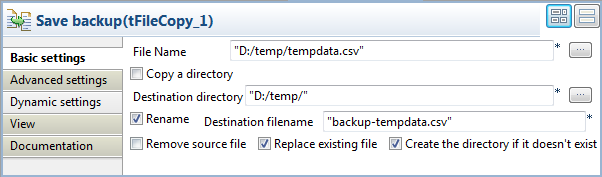
-
Fill the File Name field with the path
and filename of the temporary text file to be renamed, D:/temp/tempdata.csv in this example. -
In the Destination directory field,
specify or browse to destination directory. In this example, we will save
the backup copy in the same directory, D:/temp/. -
Select the Rename check box, and specify
the new filename in the Destination
filename field, backup-tempdata.csv. Leave the other parameters as they
are.
Document get from Talend https://help.talend.com
Thank you for watching.
Subscribe
Login
0 Comments