Configuring the query of the customer records of interest
-
Double-click tMySQLInvalidRows to open
its Component view.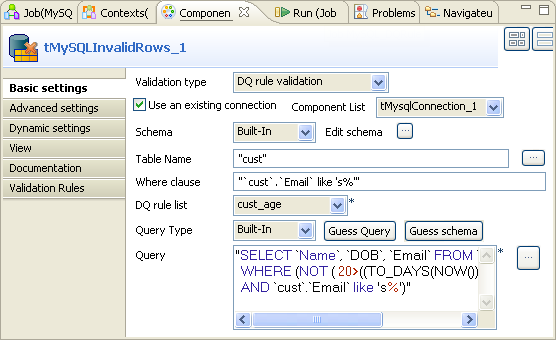
-
In the Validation type field, select
DQ rule validation in order to use the
given data quality rule. -
Select Use an existing connection to
reuse the connection that tMysqlConnection
creates. -
Click the […] button next to Edit schema to open the schema editor.
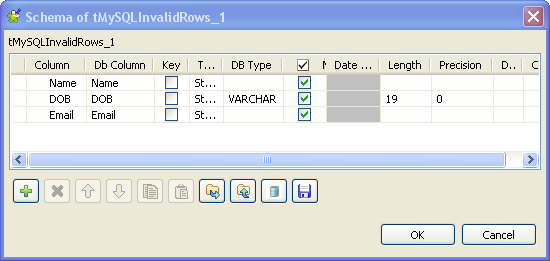
-
Click the [+] button three times to add
throw rows and rename them as Name,
DOB and Email, respectively. -
In the DOB row, select VARCHAR in the DB
type column, enter 19 in
the Length column and 0 in the Precision column. -
Click OK to validate these changes and
accept the propagation prompted by the pop-up dialog box. -
In the Table name field, enter or browse
to the database table to be checked, cust
in this example. -
In the Where clause field, type in the
where clause to be used, in addition to the given data quality rule, to
query the customer data of interest. In this scenario, enter
cust.Emaillike 's%'
retrieve the email records beginning with the letter s or S. -
In the DQ rule list field, select the
data quality rule to be used. In this scenario, select cust_age. This rule is a demo rule reading
18<=((TO_DAYS(NOW())-TO_DAYS(DOB))/365)
You can check the available data quality rules in Libraries > Rules > SQL of the DQ
Repository. The cust_age
rule can be imported from the TDQEEDEMOJAVA project.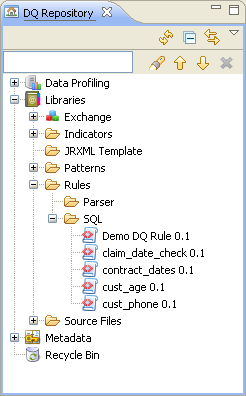 For further information about the DQ
Repository and its items and about how to import the data
quality demo project, see the
Talend Studio
User Guide -
Click Guess Query to generate the
corresponding query clause that uses the Not clause. -
In the Query field, change 18 to 20 to
modify the clause as the following:12345"SELECT `Name`, `DOB`, `Email` FROM `crm`.`cust`WHERE (NOT ( 20>((TO_DAYS(NOW())-TO_DAYS(DOB))/365) )AND `cust`.`Email` like 's%')"This clause allows you to select the customers whose ages count 20 or more.
Document get from Talend https://help.talend.com
Thank you for watching.
Subscribe
Login
0 Comments