Configuring the tSCPPut component
-
Double-click the tSCPPut component to
open its Basic settings view.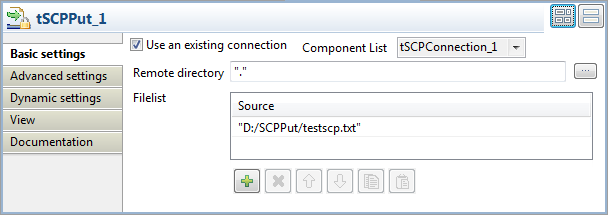
-
Select the Use an existing connection
check box and then select the connection you have configured from the
Component List. -
Click the [+] button to add one row in
the Filelist table, and enter the full
local path of the file to be uploaded in the corresponding Source column. In this example, it is “D:/SCPPut/testscp.txt”.
Document get from Talend https://help.talend.com
Thank you for watching.
Subscribe
Login
0 Comments