Configuring tPigStoreResult
-
Double-click the tPigStoreResult labeled
normal to open its Component view.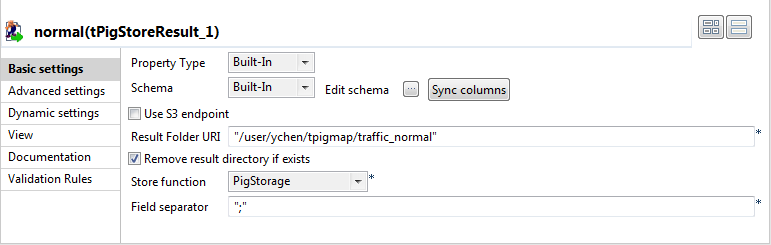
-
In the Result file field, enter the
directory you need to write the result in. In this scenario, it is /user/ychen/tpigmap/traffic_normal, which
receives the records reading normal. -
Select Remove result directory if exists
check box. -
In the Store function list, select
PigStorage to write the records in
human-readable UTF-8 format. -
In the Field separator field, enter
;. - Repeat the same operations to configure the tPigStoreResult labeled jam, but set the directory, in the Result file field, as /user/ychen/tpigmap/traffic_jam.
Note:
If either of the components does not retrieve its schema from tPigMap, a warning icon appears. In this case, click
the Sync columns button to retrieve the schema
from the preceding one and once done, the warning icon disappears.
Document get from Talend https://help.talend.com
Thank you for watching.
Subscribe
Login
0 Comments