Defining the action on data
-
In the Action on data list, select the
action you want to carry on, Delete in this
example. -
Click Sync columns to retrieve the schema
from the preceding component. In this example, we want to retrieve the input
column: address. -
Click the three-dot button next to Edit
Schema to open a dialog box where you can verify the
retrieved schema.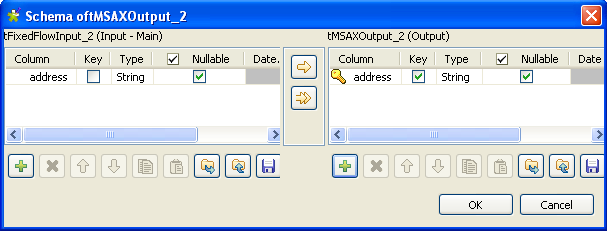
-
In the output schema, select the Key
check box next to the column name you want to define as a key column, and
then click OK to validate your changes and
close the dialog box.Note:When you select Delete as an action
on data, you must always define the Reference
column as a key column in order for tMSAXOutput to delete rows based on this key
column. -
In the Additional columns list, click the
plus button to add one line and define the parameters the component will use
as basis for the delete operation. -
Set a name, an operator, a data type, a local expression, a position and a
reference column in the corresponding columns for the line you added.In this example, we want to delete from the ADDRESS
table in the MicrosoftAX server all rows in which the address column is not
equal to the address in the key address column and that
reads as the following:New York-Midtown Manhattan.Note:When you select Delete as an action
on data, you must always set Position
to Replace. Otherwise, all settings in
the Additional columns will not be
taken into account when executing your Job.
Document get from Talend https://help.talend.com
Thank you for watching.
Subscribe
Login
0 Comments