Executing the normalization Job
Press F6 to run this Job.
In the console of the Run view, you can read
the output data structure. Each instance of the XML data is written on a
separate row because the Pretty print check box
is selected in the Advanced settings view of
the tStandardizeRow component.
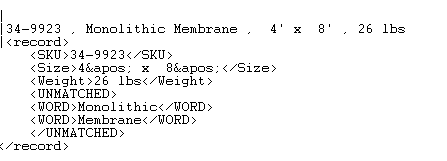
Corresponding to the raw data, such as, 34-9923, Monolithic
Membrance, 4′ x 8′, 26 lbs, an XML segment is generated where the
compliant data are separated from the noncompliant data (unmatched). Thus the
raw data are normalized.
Again from this console, you can read that a row is rejected as it contains
unrecognizable data.

Document get from Talend https://help.talend.com
Thank you for watching.
Subscribe
Login
0 Comments