Extracting director data from MongoDB
-
Double-click tMongoDBLookupInput to open its
Component view.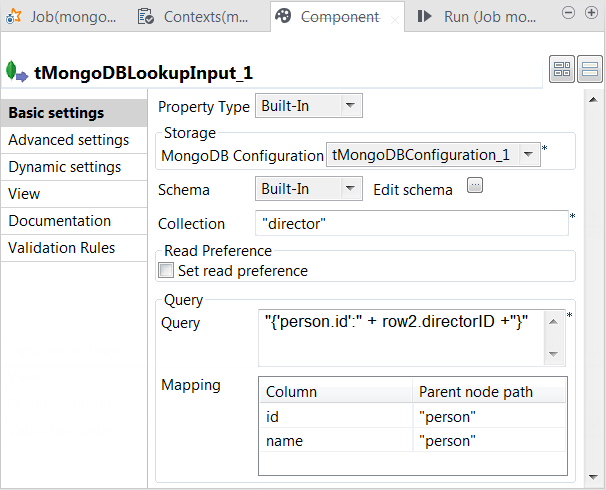
- Click the […] button next to Edit schema to open the schema editor.
-
Click the [+] button to add the schema
columns as shown in this image.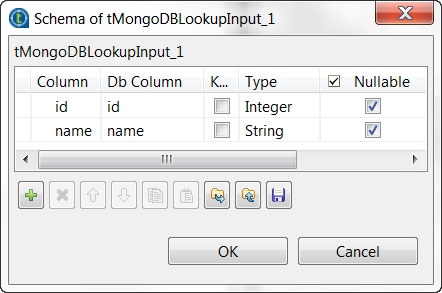
-
In the Collection field, enter the name of
the collection from which tMongoDBLookupInput
extracts data. -
In the Query field, enter the following
query."{'person.id':" + row2.directorID +"}"
In this statement, row2 represents the main
flow to tMap and
row2.directorID the directorID
column of this flow. You need to adapt this row2 to the label of the main flow link in your Job.The whole statement means to select every record in which the id field within the person field has the same value as this directorID column.The example above shows how to use the schema of the main flow to construct
the SQL statement to load only the matched records into the lookup flow. This
approach ensures that no redundant records are stored in memory before being
sent to tMap. -
In the Mapping table, the id and the name
columns have been automatically added. Enter, within double quotation marks,
person in the Parent
node path column for each row.This table defines how the hierarchical construct of the data from MongoDB
should be interpreted in order to fit the schema of tMongoDBLookupInput.
Document get from Talend https://help.talend.com
Thank you for watching.
Subscribe
Login
0 Comments