Extracting exact match
-
Double-click tExtractXMLField to display
the component Basic settings view.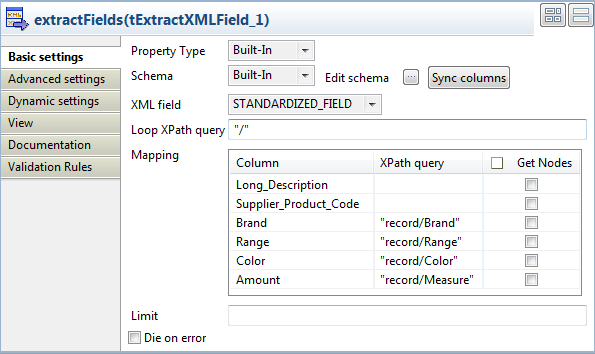
-
Click the […] button next to the
Edit schema field to open the schema
editor, add four columns in the output flow and name them as
Brand, Range,
Color and Amount. Click
OK to validate and close the
editor.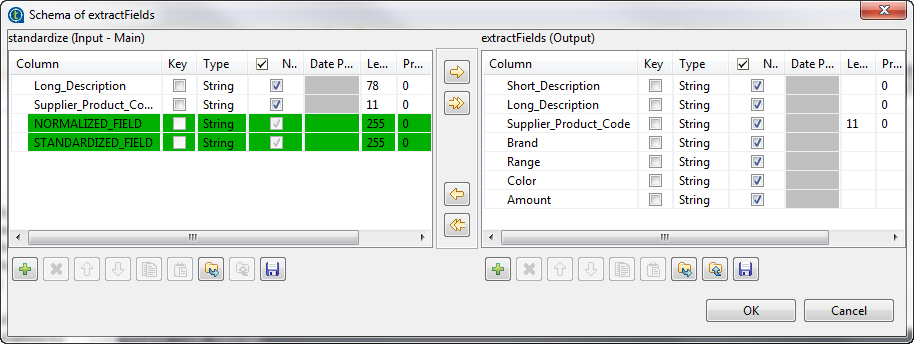
-
In the XML field field, check that the
STANDARDIZED_FIELD column is
selected.The content of the STANDARDIZED_FIELD
column is an XML field with a<record>tag as root. Under
this tag, the structure defined by the rules configured in the tStandardizeRow component allows to extract items
from the input flow. -
In the Loop XPath query field, enter “/”
to define the root as the loop node. -
In XPath query field in the Mapping table, enter respectively
“record/Brand”,
“record/Range”
“record/Color”
and “record/Measure”. -
Double-click tFileOutputExcel to display
the component Basic settings view.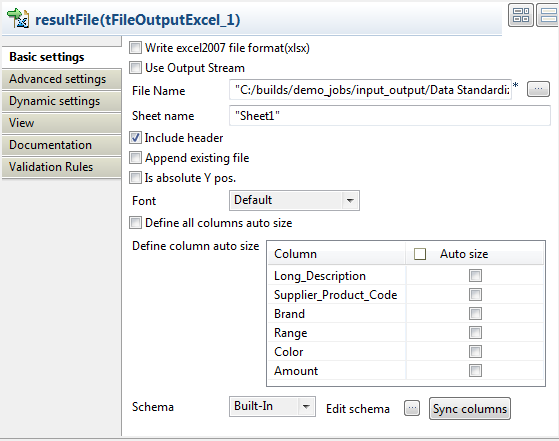
-
Set the destination file name as well as the Sheet name and select the
Include header check box.
Document get from Talend https://help.talend.com
Thank you for watching.
Subscribe
Login
0 Comments