Indexing clean and deduplicated data in Elasticsearch
-
The Elasticsearch cluster and Elasticsearch-head are started before executing
the Job.For more information about Elasticsearch-head, which is a plugin for browsing
an Elasticsearch cluster, see https://mobz.github.io/elasticsearch-head/.
-
Double click the tMatchIndex component to open its
Basic settings view and define its properties.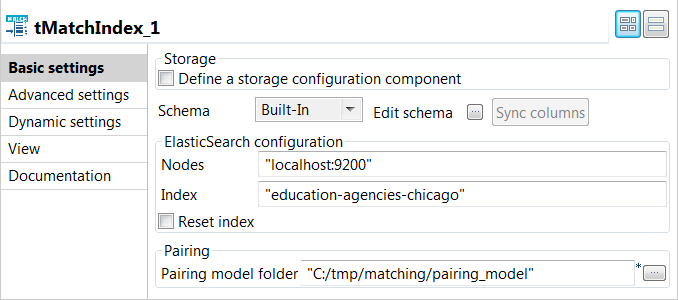
-
In the Elasticsearch configuration area, enter the
location of the cluster hosting the Elasticsearch system to be used in the
Nodes field, for example:"localhost:9200"
-
Enter the index to be created in Elasticsearch in the
Index field, for example:education-agencies-chicago
-
If you need to clean the Elasticsearch index specified in the
Index field, select the Reset
index check box. -
Enter the path to the local folder from where you want to retrieve the pairing
model files in the Pairing model folder. -
Press F6 to save and execute the
Job.
tMatchIndex created the
education-agencies-chicago index in Elasticsearch,
populated it with the clean data and computed the best suffixes based on the
blocking key values.
You can browse the index created by tMatchIndex using the
plugin Elasticsearch-head.


You can now use the indexed data as a reference data set for the
tMatchIndexPredict component.
You can find an example of how to do continuous matching
using tMatchIndexPredict on Talend Help Center (https://help.talend.com).