Inserting data into the new Snowflake table
-
Double-click the first tFixedFlowInput component to open
its Basic settings view. -
Click the […] button next to Edit
schema and in the pop-up dialog box, define the schema by adding
four columns: id of Integer type as the primary key,
name and role of String type,
and salary of Double type.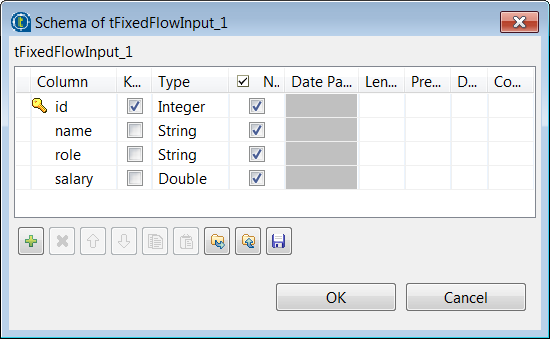
-
Click OK to save the schema changes. In the pop-up
dialog box, click Yes to propagate the
schema to the next component. -
Select Use Inline Content in the
Mode area. Then in the Content
field displayed, enter the following employee data to be inserted.123111;Mark Smith;tester;15000.00222;Thomas Johnson;developer;18000.00333;Teddy Brown;tester;16000.00 -
Double-click the first tJDBCOutput component to open its
Basic settings view. -
Select the Use an existing connection check box and from
the Component List drop-down list displayed, select the
connection component to reuse the connection created by it,
tJDBCConnection_1 in this example. -
In the Table field, enter the name of the table into
which the employee data will be written, employee in this
example. -
In the Action on data drop-down list, select
Insert to insert the employee data transferred from
the first tFixedFlowInput component.
Document get from Talend https://help.talend.com
Thank you for watching.
Subscribe
Login
0 Comments