Inserting data into the source table
-
Double-click tFixedFlowInput to open its
Basic settings view.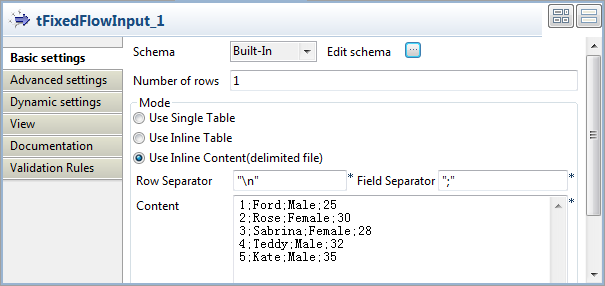
-
Click the […] button next to Edit schema to open the schema editor.
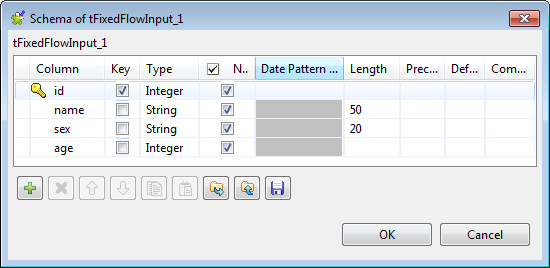 Click four times the [+] button to add four columns:
id and age of the integer type, name and sex of the
string type.Click OK to close the schema editor and
accept the propagation prompted by the pop-up dialog box. -
Select Use Inline Content(delimited file) in the
Mode area, and then enter the following
input data in the Content field:123451;Ford;Male;252;Rose;Female;303;Sabrina;Female;284;Teddy;Male;325;Kate;Male;35 -
Double-click tOracleOutput to open its
Basic settings view.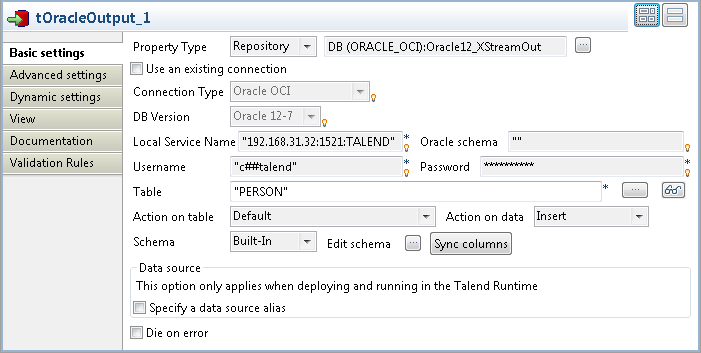
-
Set Property Type to Repository and select the connection metadata corresponding
to the Oracle database on which the XStream outbound server is configured,
Oracle12_XStreamOut in this example. The connection
type, database version and other connection details information will be
completed automatically. -
In the Table field, enter the name of the
table into which the input data will be inserted. In this example, it is
PERSON. -
Click the […] button next to Edit schema to open the schema editor to ensure
the schema has been synced up.
Document get from Talend https://help.talend.com
Thank you for watching.
Subscribe
Login
0 Comments