Listing all files in the three buckets
-
Double-click the tGSList component to
open its Basic settings view in the
Component tab.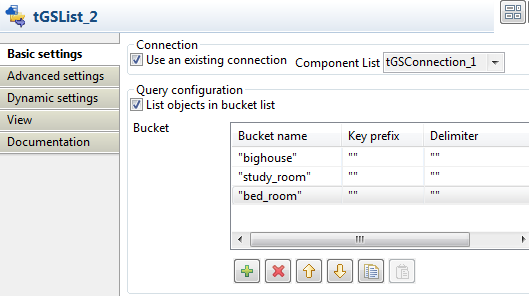
-
Select the Use an existing connection
check box and then select the connection you have configured earlier. -
Select the List objects in bucket list
check box. In the Bucket table, enter the
name of the three buckets in the Bucket
name column, bighouse,
study_room, and bed_room. -
Double-click the tIterateToFlow component
to open its Basic settings view in the
Component tab.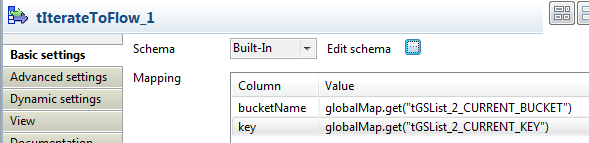
-
Click Edit schema to define the data to
pass on to tLogRow.In this example, add two columns bucketName and key, and
set their types to Object.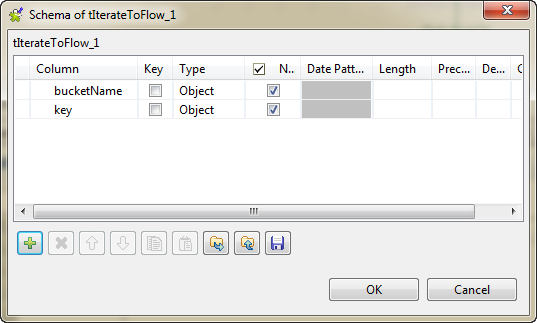
-
The Mapping table will be populated with
the defined columns automatically.In the Value column, enter globalMap.get(“tGSList_2_CURRENT_BUCKET”) for
the bucketName column and globalMap.get(“tGSList_2_CURRENT_KEY”) for the
key column. You can also press
Ctrl + Space and then choose the
appopriate variable. -
Double-click the tLogRow component to
open its Basic settings view in the
Component tab. -
Select Table (print values in cells of a
table) for a better view of the results.
Document get from Talend https://help.talend.com
Thank you for watching.
Subscribe
Login
0 Comments