Moving a file from one bucket to another bucket and renaming it
-
Double-click the second tGSCopy component
to open its Basic settings view in the
Component tab.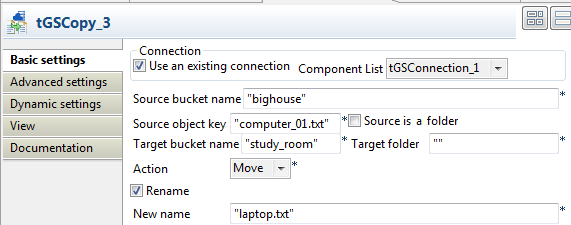
-
Select the Use an existing connection
check box and then select the connection you have configured earlier. -
In the Source bucket name field, enter
the name of the bucket from which you want to move files, bighouse in this example. -
In the Source object key field, enter the
key of the object to be moved, computer_01.txt in this example. -
In the Target bucket name field, enter
the name of the bucket into which you want to move files, study_room in this example. -
Select Move from the Action list. The specified source file computer_01.txt will be moved from the bucket
bighouse to study_room. -
Select the Rename check box. In the
New name field, enter a new name for
the moved file. In this example, the new name is laptop.txt. - Leave other settings as they are.
Document get from Talend https://help.talend.com
Thank you for watching.
Subscribe
Login
0 Comments