Preparing the source data
-
Double-click the tFixedFlowInput component to
open its Basic settings view.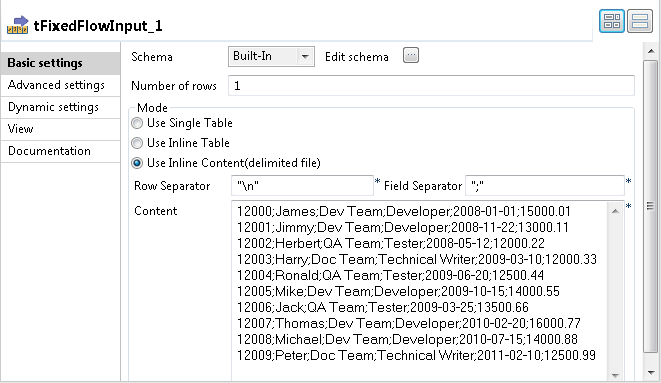
-
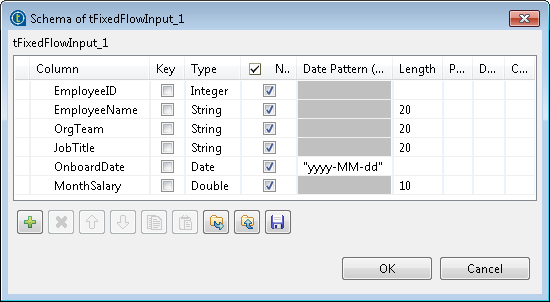
Click the […] button next to Edit schema to open the [Schema] dialog box.
-
Click the [+] button to add six columns:
EmployeeID of the Integer type, EmployeeName,
OrgTeam and JobTitle of the String type,
OnboardDate of the Data type with the yyyy-MM-dd
date pattern, and MonthSalary of the
Double type. -
Click OK to close the dialog box and accept
schema propagation to the next component. -
In the Mode area, select Use Inline Content (delimited file) and enter the
following employee data in the Content
field.1234567891012000;James;Dev Team;Developer;2008-01-01;15000.0112001;Jimmy;Dev Team;Developer;2008-11-22;13000.1112002;Herbert;QA Team;Tester;2008-05-12;12000.2212003;Harry;Doc Team;Technical Writer;2009-03-10;12000.3312004;Ronald;QA Team;Tester;2009-06-20;12500.4412005;Mike;Dev Team;Developer;2009-10-15;14000.5512006;Jack;QA Team;Tester;2009-03-25;13500.6612007;Thomas;Dev Team;Developer;2010-02-20;16000.7712008;Michael;Dev Team;Developer;2010-07-15;14000.8812009;Peter;Doc Team;Technical Writer;2011-02-10;12500.99 -
Double-click the tFileOutputDelimited
component to open its Basic settings
view.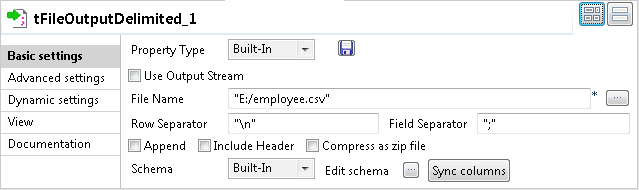
-
In the File Name field, specify the file into
which the input data will be written. In this example, it is “E:/employee.csv”. -
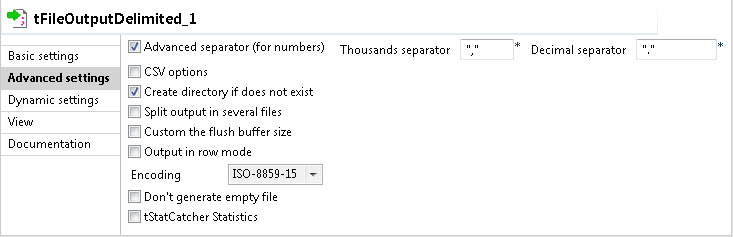
Click Advanced settings to open the Advanced settings view of the tFileOutputDelimited component.
-
Select the Advanced separator (for numbers)
check box and in the Thousands separator and
Decimal separator fields displayed, specify
the separators for thousands and decimal. In this example, the default values
“,” and “.” are used.
Document get from Talend https://help.talend.com
Thank you for watching.
Subscribe
Login
0 Comments