Saving the result data to a local file
-
Double-click tPigStoreResult to open its
Basic settings view.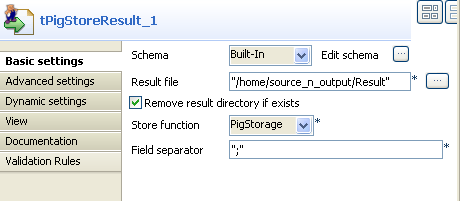
-
Click Sync columns to retrieve the schema
structure from the preceding component. -
Fill in the Result file field with the
full path to the result file.In this scenario, the result is saved in Result
file. -
Select Remove result directory if
exists. - Select PigStorage from the Store function list.
- Leave rest of the settings as they are.
Document get from Talend https://help.talend.com
Thank you for watching.
Subscribe
Login
0 Comments