Selecting the rules
-
Click in the first line of the Rule
column to display a three-dot button. Click the button to open the
[Rule] dialog box.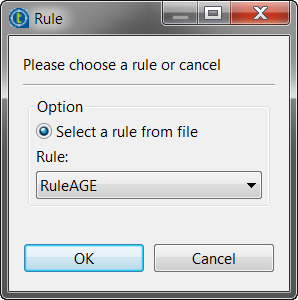
-
Select the option check box that corresponds to your needs:
Option
Description
View Rules Open the business rule file in read-only mode. Select a rule from repository Select the relevant predefined rule from the business rules file
stored in the Repository tree view. -
In the Rule list, select
the rule you want to apply to the first output schema, RuleAGE, and then click OK.The selected rule displays in the Rules column.The selected rule displays in the Rules column.
In this example, we want to apply RuleAGE to the first
output schema and RuleREGION to the second output
schema. -
Do the same to select the rule for the second output schema,
RuleREGION and then click OK. -
In the design workspace, double-click each of the tLogRow components to define its properties.
For more information, see tLogRow. -
Save your Job and press F6 to execute
it.
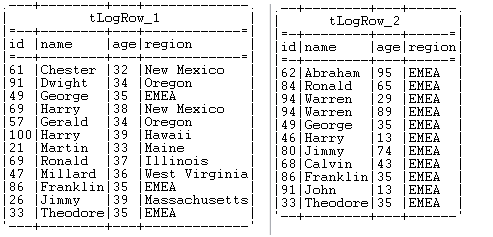
The Run console displays the two output flows: the first
output flow lists all clients whose age is between 30 and 39, and
the second output flow lists all clients who live in the EMEA region.
Document get from Talend https://help.talend.com
Thank you for watching.
Subscribe
Login
0 Comments