Set the output component
-
Double-click the tPivotToColumnsDelimited
component to open its Basic settings
view.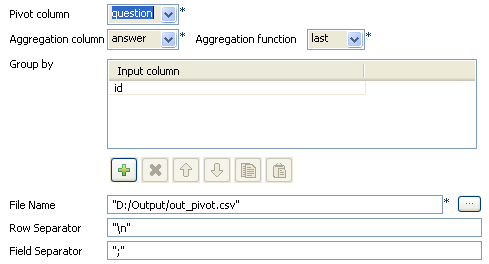
-
In the Pivot column field, select the
pivot column from the input schema. this is often the column presenting most
duplicates (pivot aggregation values). -
In the Aggregation column field, select
the column from the input schema that should gets aggregated. -
In the Aggregation function field, select
the function to be used in case duplicates are found out. -
In the Group by table, add an Input
column, that will be used to group by the aggregation column. -
In the File Name field, browse to the
output file path. And on the Row and
Field separator fields, set the
separators for the aggregated output rows and data.
Document get from Talend https://help.talend.com
Thank you for watching.
Subscribe
Login
0 Comments