Setting up the Job to route the update report record to Event Manager
- In the Integration perspective, right-click Job Designs in the Repository tree view and select Create Standard Job in the contextual menu.
-
Enter RouteRecord in the
Name field in the wizard that opens, and then click
Finish. -
Drop the tMDMRouteRecord
component from the Palette onto the
design workspace. - Double click this component to open its Component view.
-
In the URL field, enter
the URL for accessing your MDM server.In this example, enter
http://localhost:8180/talendmdm/services/soap. -
In the Username and the
Password fields, enter the
credentials for accessing the MDM server. -
In the Data Container
field, enter the data container name that stores the record you want to
route.It is UpdateReport in this example. -
In the Entity Name
field, enter the entity name that the record you want to route belongs to.It is Update in this example. -
In the IDS area, click
the plus button under the table to add a new line. -
In the newly added line, fill in the primary key of the update
report record to be routed to Event
Manager, which was read earlier from the UpdateReport data container.In this example, the primary key is
genericUI.1499236505686.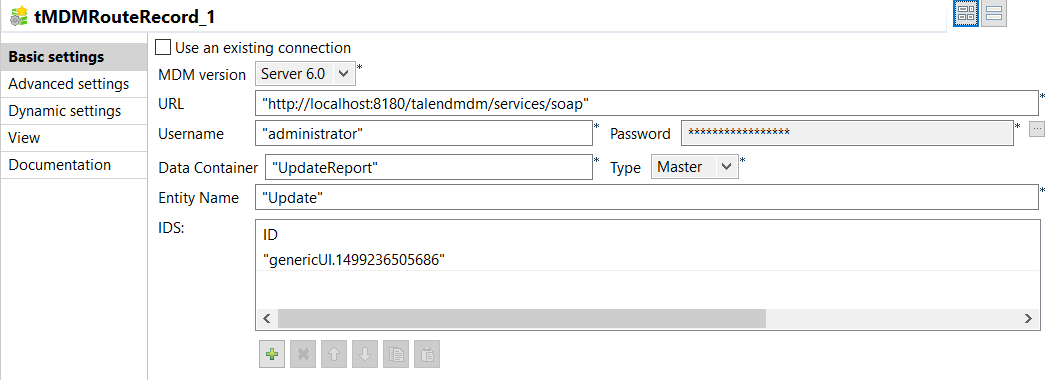
Document get from Talend https://help.talend.com
Thank you for watching.
Subscribe
Login
0 Comments