Setting a JVM argument and finalizing the Job
-
Double-click the tFileOutputExcel component
to display the Basic settings view and define
the component properties.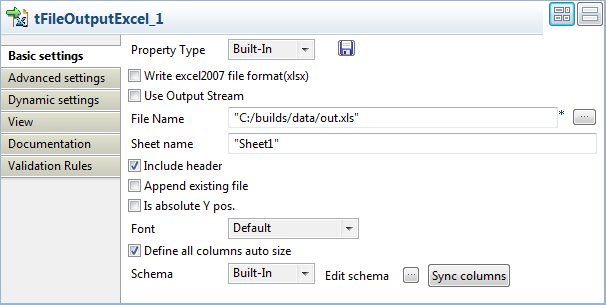
-
Set the destination file name as well as the sheet name and then select the
Include header and Define all columns auto size check boxes. -
Click the Run tab and then in the open view
click Advanced settings.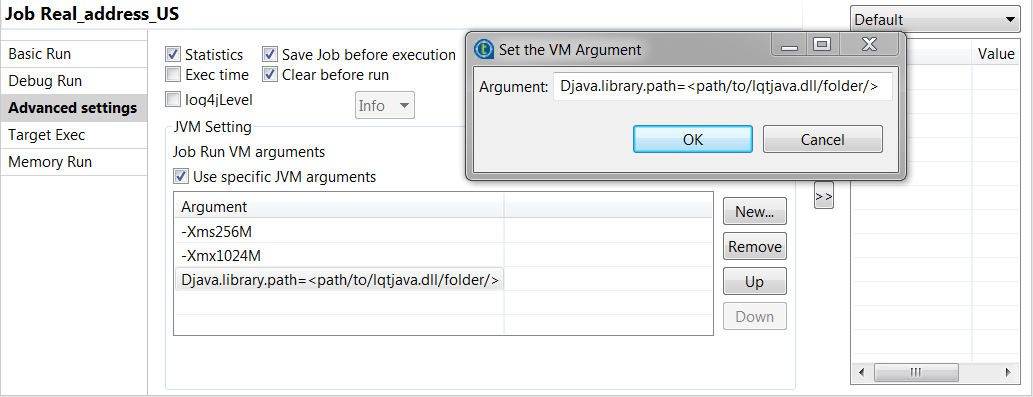
-
Select the Use specific JVM arguments check
box and then click New…. -
In the pop-up window, set the following JVM argument:
Djava.library.path=<path/to/lqtjava.dll/folder/>.In this argument, you must indicate the folder where the
loqate library, called liblqtjava.so on Linux or
lqtjava.dll on Windows, is installed.Without the correct JVM argument setting, the following error
is to be expected:java.lang.Error:.
java.lang.UnsatisfiedLinkError -
Save your Job and press F6 to execute
it.tLoqateAddressRow reads the input address
data. It parses, verifies, cleanses, standardizes addresses and gives the result
in the output rows you defined in the output schema.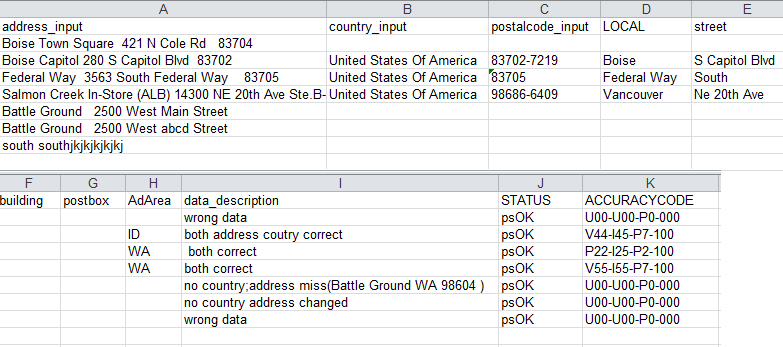 tLoqateAddressRow matches input address
data against the Loqate data file you downloaded locally.The STATUS standard output column returns thepsOKstatus for all address rows. This means that
the verification process of all address rows could be completed successfully by
the component. For further information about process status, see Process status in tLoqateAddressRow.The ACCURACYCODE standard output column returns a verification
code for each of the processed address rows. For example, the first verification
codeV44-I45-P7-100means:- Verification status = V (verified): a complete match was made between
the input address and a single record from the available reference
data. - Post-processed verification match level = 4 (premises): the level to
which the input data matches the available reference data once all
changes and additions performed during the verification process have
been taken into account. - Pre-processed verification match level = 4 (premises): the level to
which the input data matches the available reference data prior to any
changes or additions performed during the verification process. - Parsing status = I (identified and parsed): all components of the input
data have been able to be identified and placed into output fields. - Lexicon identification match level = 4 (premises): using pattern
matching, a numeric value or word has been identified as a premises
number or name. - Context identification match level = 5 (delivery point, PostBox or
SubBuilding): a numeric value or word has been identified as a post box
number or sub building name. - Postcode Status = P7 (added): the primary postal code for the country
has been verified and a secondary postal code has been added. - Match score = 100 (complete similarity): the input data and closest
reference data match completely.
For further information about what values this code is made up
of and the implications of each segment, see Address verification codes in tLoqateAddressRow. - Verification status = V (verified): a complete match was made between
Document get from Talend https://help.talend.com
Thank you for watching.
Subscribe
Login
0 Comments