Setting up the connection to the Sage X3 Web server
-
Double-click tSageX3Output to set its
properties from the Basic Settings view.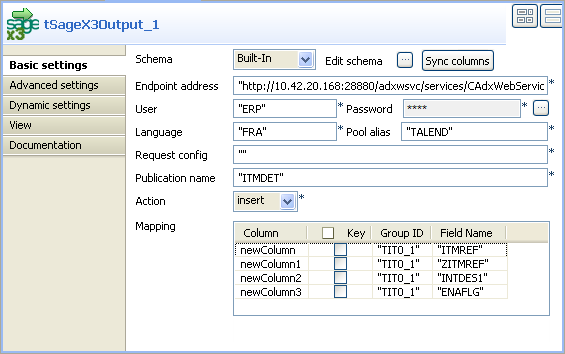
-
In the Endpoint address field, type in
the URL address of the Web service provided by the Sage X3 Web server. In
this example, it is
http://10.42.20.168:28880/adxwsvc/services/CAdxWebServiceXmlCC
-
In the User field, type in the user name
of the given Sage X3. In this example, it is
ERP. -
In the Language field, type in the name
of the X3 language code used to start a connection group. In this example,
it is FRA. -
In the Pool alias field, type in the name
of connection pool to be used. In this example, this connection pool is
called TALEND. -
In the Publication name field, type in
the publication name of the object to be called. In this scenario, the
publication name is ITMDET. - In the Action field, select insert from the drop-down list.
Document get from Talend https://help.talend.com
Thank you for watching.
Subscribe
Login
0 Comments