Transforming messages to words
-
Double-click the tModelEncoder component labelled Tokenize to
open its Component view. This component
tokenize the SMS messages into words.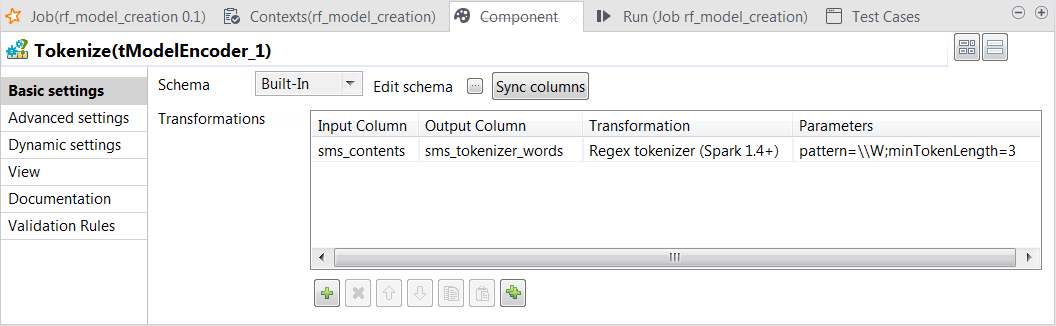
-
Click the Sync columns button to retrieve the schema from the
preceding one. -
Click the […] button next to Edit
schema to open the schema editor. -
On the output side, click the [+] button to add one row and in the Column column, rename it to
sms_tokenizer_words. This column is used to carry the
tokenized messages.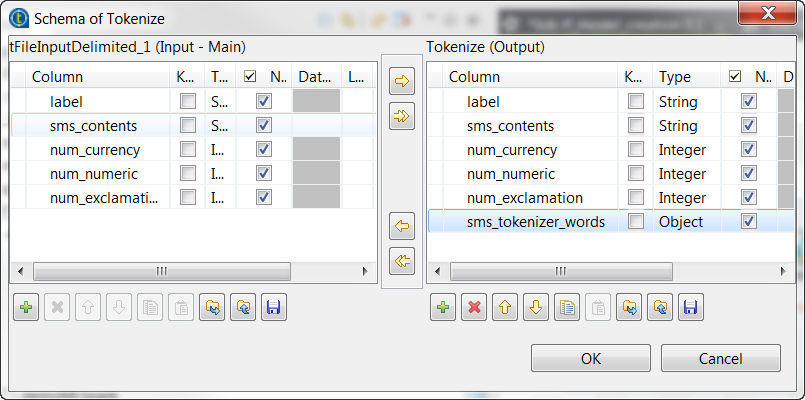
-
In the Type column,
select Object for this
sms_tokenizer_words row. - Click OK to validate these changes.
-
In the Transformations
table, add one row by clicking the [+]
button and then proceed as follows:-
In the Input column column, select the column
that provides data to be transformed to features. In this scenario, it
is sms_contents. -
In the Output column column, select the column
that carry the features. In this scenario, it is
sms_tokenizer_words. -
In the Transformation column, select the
algorithm to be used for the transformation. In this scenario, it is
Regex tokenizer. -
In the Parameters column, enter the parameters
you want to customize for use in the algorithm you have selected. In
this scenario, enter
pattern=\W;minTokenLength=3.
-
In the Input column column, select the column
Using this transformation, tModelEncoder
splits each input message by whitespace, selects only the words contains at least 3
letters and put the result of the transformation in the sms_tokenizer_words column. Thus currency symbols, numeric values,
punctuations and words such as a, an
or to are excluded from this column.
Document get from Talend https://help.talend.com
Thank you for watching.
Subscribe
Login
0 Comments