Specify which table the subscriber wants to subscribe to and then activate
the subscription
-
Right-click the Leafact schema in the source CRM and
select Add CDC in the drop-down list. The
[Create Subscriber and Execute SQL
Script] dialog box displays.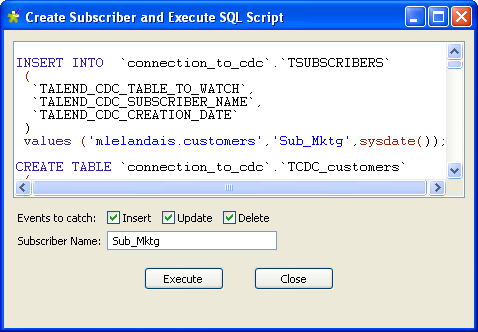
-
In the Events to catch check boxes,
select Insert, Update and Delete to catch
inserted, updated or deleted data. -
In the Subscriber Name field, enter the
name of the subscriber that will have access to the modifications, in this
scenario Sub_Mktg for the Marketing department. -
Click Execute and then Close to validate the subscription.
In the CDC Foundation folder, the two
created tables display and the schema node of the catched table is marked
with a green CDC symbol.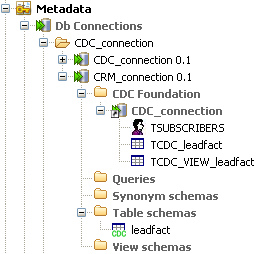
Document get from Talend https://help.talend.com
Thank you for watching.
Subscribe
Login
0 Comments