Testing the KMeans model
-
Double-click tPredict to open its
Component view.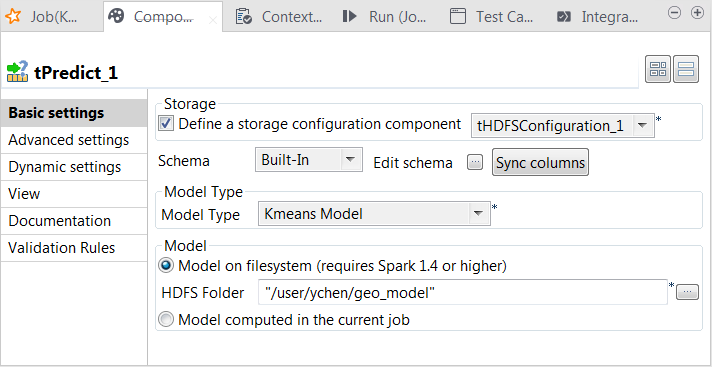
-
Select the Define a storage configuration
component check box and select the tHDFSConfiguration component to be used. -
From the Model type drop-down list, select
Kmeans model. -
Select the Model on filesystem radio button and enter the
directory in which the KMeans model is stored.In this case, the tPredict component contains a
read-only column called label in which the
model provides the labels of the clusters. -
Double-click tFileOutputDelimited to open its
Component view.
-
Select the Define a storage configuration
component check box and select the tHDFSConfiguration component to be used. -
In the Folder field, browse to the location
in HDFS in which you want to store the prediction result. - From the Action drop-down list, select Overwrite. But if target folder does not exist, select Create.
-
Select the Merge result to single file check
box and then the Remove source dir check
box. -
In the Merge file path field, browse to the
location in HDFS in which you want to store the merged prediction result.
Document get from Talend https://help.talend.com
Thank you for watching.
Subscribe
Login
0 Comments