Setting up the child Jobs
-
Create a new Job named ChildJob1, and add
a tFixedFlowInput component and a
tLogRow component to it.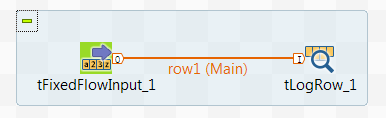
- Connect the tFixedFlowInput component to the tLogRow component using a Row > Main connection.
-
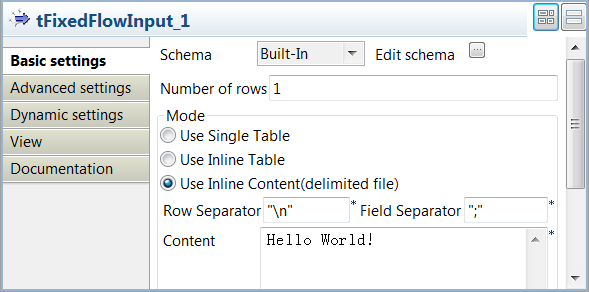
Double-click the tFixedFlowInput component to open its Basic settings view.
-
Click the […] button
next to Edit schema and in the pop-up
dialog box, define the schema of the input data by adding one column
Message of String type. When done, click
OK to close the dialog box and click
Yes when prompted to propagate the schema to the next
component. -
In the Mode area, select Use Inline Content(delimited file) and enter the
message you want to show on the console in the Content field, Hello World! in this
example. -
Double-click the tLogRow
component and on its Basic settings view, select the
Table mode to display the execution
result in table cells. -
Create copy of this Job and name it
ChildJob2, and enter another message in the
Content field of the tFixedFlowInput component, Hello
Talend! in this example.
Document get from Talend https://help.talend.com
Thank you for watching.
Subscribe
Login
0 Comments