tMysqlSP
Calls a MySQL database stored procedure.
tMysqlSP offers a convenient way to centralize multiple
or complex queries in a database and call them easily.
tMysqlSP Standard properties
These properties are used to configure tMysqlSP running in the Standard Job framework.
The Standard
tMysqlSP component belongs to the Databases family.
The component in this framework is generally available.
Basic settings
|
Property type |
Either Built-in or |
|
|
Built-in: No property data stored |
|
|
Repository: Select the repository |
|
Host |
Database server IP address |
|
Port |
Listening port number of DB server. |
|
Database |
Name of the database |
|
Username and |
DB user authentication data. To enter the password, click the […] button next to the |
|
Schema and Edit |
A schema is a row description. It defines the number of fields (columns) to |
|
|
Built-In: You create and store the |
|
|
Repository: You have already created |
|
Click Edit schema to make changes to the schema.
|
|
|
SP Name |
Type in the exact name of the Stored Procedure |
|
Is Function / Return result |
Select this check box, if a value only is to be returned. Select on the list the schema column, the value to be returned is |
|
Parameters |
Click the Plus button and select the various Schema Columns that will be required by the Select the Type of IN: Input parameter.
OUT: Output parameter/return
IN OUT: Input parameters is to be
RECORDSET: Input parameters is to Note:
Check Scenario: Inserting data in mother/daughter tables if you want to analyze a set of records from a |
Usage
|
Usage rule |
This component is used as intermediary component. It can be used |
|
Dynamic settings |
Click the [+] button to add a The Dynamic settings table is For examples on using dynamic parameters, see Scenario: Reading data from databases through context-based dynamic connections and Scenario: Reading data from different MySQL databases using dynamically loaded connection parameters. For more information on Dynamic |
|
Limitation |
The Stored Procedures syntax should match the Database syntax. |
Scenario: Using tMysqlSP to find a State Label using a stored
procedure
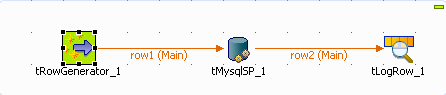
The following job aims at finding the State labels matching the odd State IDs in a
Mysql two-column table. A stored procedure is used to carry out this operation.
-
Drag and drop the following components used in this example: tRowGenerator, tMysqlSP, tLogRow.
-
Connect the components using the Row Main
link. -
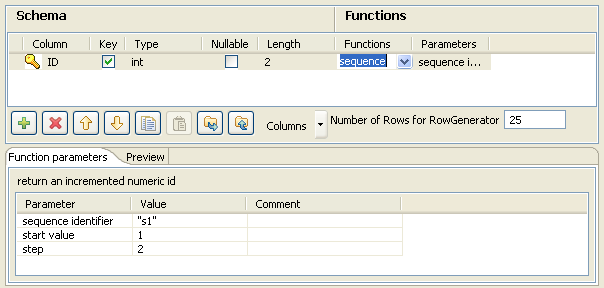
The tRowGenerator is used to generate the
odd id number. Double-click on the component to launch the editor.
-
Click on the Plus button to add a column to
the schema to generate. -
Select the Key check box and define the
Type to Int. -
The Length equals to 2 digits max.
-
Use the preset function called sequence but
customize the Parameters in the lower part of the window.
-
Change the Value of step from 1 to 2 for
this example, still starting from 1. -
Set the Number of generated rows to 25 in
order for all the odd State id (of 50 states) to be generated. -
Click OK to validate the
configuration. -
Then select the tMysqlSP component and
define its properties.

-
Set the Property type field to Repository and select the relevant entry on the list.
The connection details get filled in automatically. -
Else, set manually the connection information.
-
Click Sync Column to retrieve the generated
schema from the preceding component. -
Then click Edit Schema and add an extra
column to hold the State Label to be output, in addition to the ID. -
Type in the name of the procedure in the SP
Name field as it is called in the Database. In this example,
getstate. The procedure to be executed states as
follows:1234567DROP PROCEDUREIF EXISTS `talend`.`getstate` $$CREATE DEFINER=`root`@`localhost` PROCEDURE `getstate`(IN pid INT, OUTpstate VARCHAR(50))BEGINSELECT LabelState INTO pstate FROM us_states WHERE idState = pid;END $$ -
In the Parameters area, click the plus
button to add a line to the table. -
Set the Column field to
ID, and the Type field
to IN as it will be given as input parameter to the
procedure. -
Add a second line and set the Column field
to State and the Type to
Out as this is the output parameter to be
returned. -
Eventually, set the tLogRow component
properties.

-
Synchronize the schema with the preceding component.
-
And select the Print values in cells of a
table check box for reading convenience. -
Then save your Job and execute it.

The output shows the state labels corresponding to the odd state ids as defined in the
procedure.
Check Scenario: Inserting data in mother/daughter tables if you want to analyze a set of records from a
database table or DB query and return single records.