Validating that the CSV file is imported successfully
-
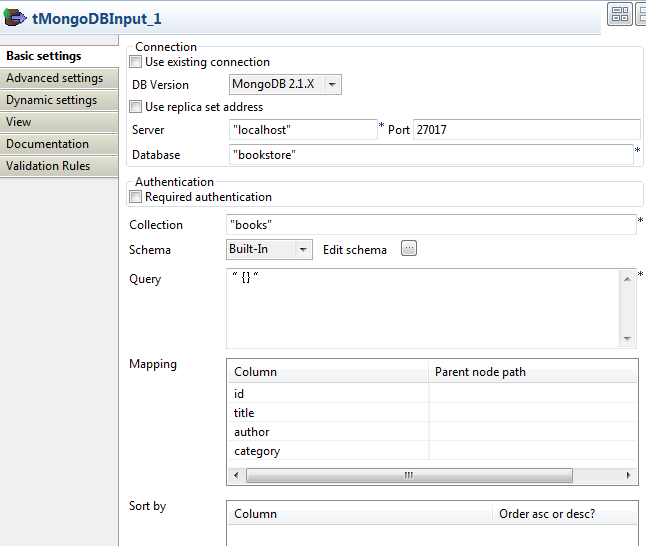
Double-click the first tMongoDBInput component to open its Basic settings view in the Component tab.
-
From the DB Version list, select the
MongoDB version you are using. -
In the Server and Port fields, fill in the information required for the
connection to MongoDB. In this example, type in localhost and 27017. -
In the Database field, type in the
database from which the data will be read, bookstore in this example. -
In the Collection field, type in the
collection from which the data will be read, books in this example. -
Click Edit schema to
define the data structure to be read from the MongoDB collection.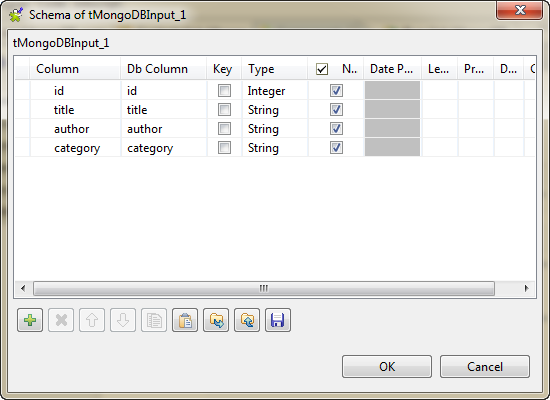
-
In the Mapping table, the Column field is automatically populated with the
defined schema. You do not need to fill in the Parent
node path column. -
Double-click the first tLogRow component to open its Basic
settings view in the Component tab.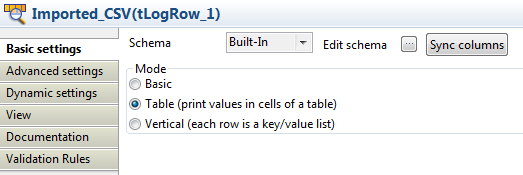
- In the Mode area, select Table (print values in cells of a table).
Document get from Talend https://help.talend.com
Thank you for watching.
Subscribe
Login
0 Comments