Writing the evaluation program in tJava
-
Double-click tJava to open its
Component view. -
Click Sync columns to ensure that
tJava retrieves the replicated schema of
tClassify. -
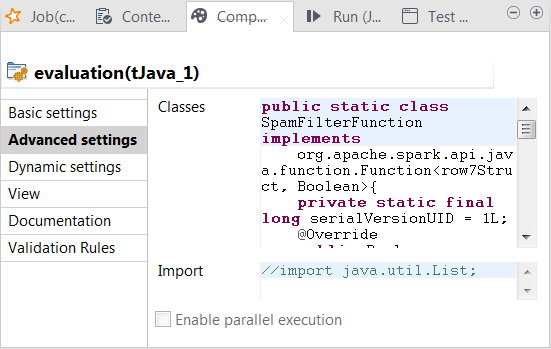
Click the Advanced settings tab to open its view.
-
In the Classes field, enter code to
define the Java classes to be used to verify whether the predicted class
labels match the actual class labels (spam for junk messages and ham for normal messages). In this scenario, row7 is the ID of the connection between
tClassify and tReplicate and carries the classification result to be sent
to its following components and row7Struct is the Java class of the RDD for the
classification result. In your code, you need to replace row7, whether it is used alone or within
row7Struct, with the corresponding
connection ID used in your Job.Column names such as reallabel or
label were defined in the previous step
when configuring different components. If you named them differently, you
need to keep them consistent for use in your code.1234567891011121314151617181920212223242526272829303132333435363738394041424344454647484950515253545556575859public static class SpamFilterFunction implementsorg.apache.spark.api.java.function.Function<row7Struct, Boolean>{private static final long serialVersionUID = 1L;@Overridepublic Boolean call(row7Struct row7) throws Exception {return row7.reallabel.equals("spam");}}// 'negative': ham// 'positive': spam// 'false' means the real label & predicted label are different// 'true' means the real label & predicted label are the samepublic static class TrueNegativeFunction implementsorg.apache.spark.api.java.function.Function<row7Struct, Boolean>{private static final long serialVersionUID = 1L;@Overridepublic Boolean call(row7Struct row7) throws Exception {return (row7.label.equals("ham") && row7.reallabel.equals("ham"));}}public static class TruePositiveFunction implementsorg.apache.spark.api.java.function.Function<row7Struct, Boolean>{private static final long serialVersionUID = 1L;@Overridepublic Boolean call(row7Struct row7) throws Exception {// true positive casesreturn (row7.label.equals("spam") && row7.reallabel.equals("spam"));}}public static class FalseNegativeFunction implementsorg.apache.spark.api.java.function.Function<row7Struct, Boolean>{private static final long serialVersionUID = 1L;@Overridepublic Boolean call(row7Struct row7) throws Exception {// false positive casesreturn (row7.label.equals("spam") && row7.reallabel.equals("ham"));}}public static class FalsePositiveFunction implementsorg.apache.spark.api.java.function.Function<row7Struct, Boolean>{private static final long serialVersionUID = 1L;@Overridepublic Boolean call(row7Struct row7) throws Exception {// false positive casesreturn (row7.label.equals("ham") && row7.reallabel.equals("spam"));}} -
Click the Basic settings tab to open its
view and in the Code field, enter the code
to be used to compute the accuracy score and the Matthews Correlation
Coefficient (MCC) of the classification model.For general explanation about Mathews Correlation Coefficient, see https://en.wikipedia.org/wiki/Matthews_correlation_coefficient from Wikipedia.12345678910111213141516171819202122232425long nbTotal = rdd_tJava_1.count();long nbSpam = rdd_tJava_1.filter(new SpamFilterFunction()).count();long nbHam = nbTotal - nbSpam;// 'negative': ham// 'positive': spam// 'false' means the real label & predicted label are different// 'true' means the real label & predicted label are the samelong tn = rdd_tJava_1.filter(new TrueNegativeFunction()).count();long tp = rdd_tJava_1.filter(new TruePositiveFunction()).count();long fn = rdd_tJava_1.filter(new FalseNegativeFunction()).count();long fp = rdd_tJava_1.filter(new FalsePositiveFunction()).count();double mmc = (double)(tp*tn -fp*fn) / java.lang.Math.sqrt((double)((tp+fp)*(tp+fn)*(tn+fp)*(tn+fn)));System.out.println("Accuracy:"+((double)(tp+tn)/(double)nbTotal));System.out.println("Spams caught (SC):"+((double)tp/(double)nbSpam));System.out.println("Blocked hams (BH):"+((double)fp/(double)nbHam));System.out.println("Matthews correlation coefficient (MCC):" + mmc);
Document get from Talend https://help.talend.com
Thank you for watching.
Subscribe
Login
0 Comments