Verifying and formatting email addresses
-
Double-click tVerifyEmail to display the
Basic settings view and define the component
properties.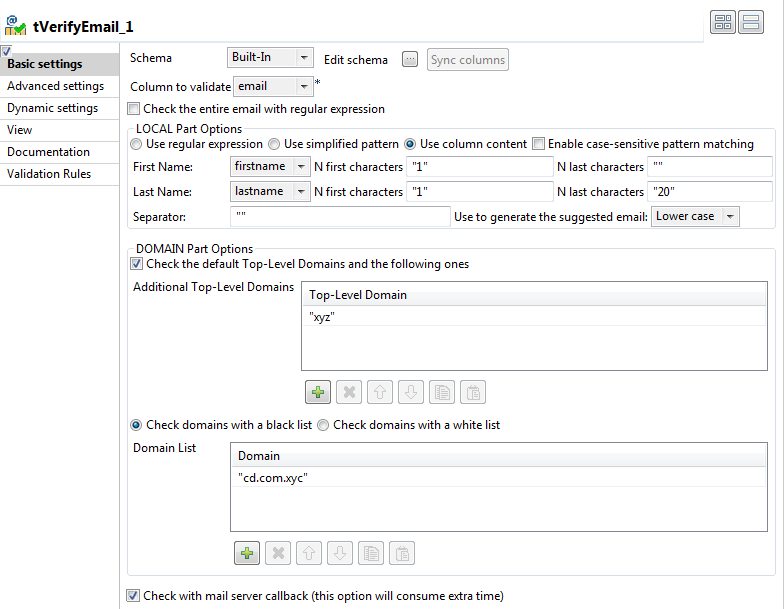
-
If required, click Sync columns to retrieve
the schema defined in the input component. -
Click the Edit schema button to open the
schema dialog box.tVerifyEmail proposes predefined read-only
address columns as shown in the below capture.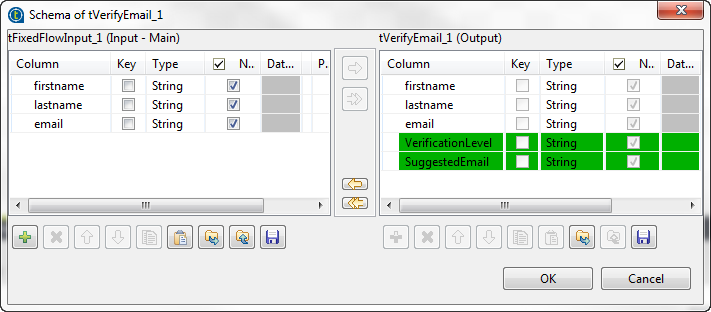 The VerificationLevel column returns the
verification status of input email addresses. The SuggestedEmail column returns a suggested content for the email part
before the @ sign. This column is shown in the output schema only if you select
theUse column content option in the Local Part Options section. For further information about
output columns, see tVerifyEmail Standard properties. -
Move any of the input columns to the output schema if you want to show them in
the verification results, click OK and accept
to propagate the changes. -
From the Column to validate list, select the
email column. -
In the LOCAL Part Options section, select the
Use column content option.In this example, you want to check the email part before the @ sign to see if
it starts with the first letter of the first name followed by the family name,
all in lower case. If the local part does not match what you have defined,
tVerifyEmail will rewrite it by using the
parameters you define. -
In the DOMAIN Part Options, select:
-
the Check the default Top-level Domains and the
following ones check box and define in the table the
additional top-level domain against which you want to validate email
addresses. -
the Check domains with a black list
check box and define in the Domain list
table the domain to consider as black listed.
-
-
Select the Check with mail server callback
check box to enable the mail server to verify the complete address and accept or
reject the email.
Document get from Talend https://help.talend.com
Thank you for watching.
Subscribe
Login
0 Comments