Writing the output data into MySQL
-
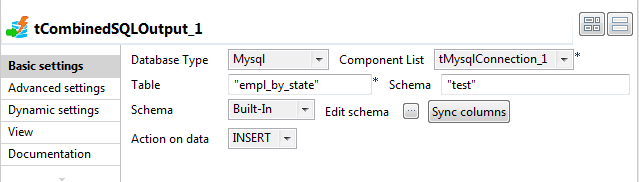
In the design workspace, select tCombinedSQLOutput and click the Component tab to access the configuration panel.
-
On the Database type list, select the
relevant database. -
On the Component list, select the relevant
database connection component if more than one connection is used. -
In the Table field, enter the name of the
target table which will store the results of the aggregation operations,
empl_by_state in this caseThe tCombinedSQLOutput component requires
that an output table already exists in the database to work. That is why the
empl_by_state table was created earlier in the
scenario.In this example, the Schema field doesn’t
need to be filled out as the database is not Oracle. -
Click the Sync columns button to retrieve the
schema from the previous component.In this scenario, tCombinedSQLOutput
instantiates seven columns coming from the previous component in the
Job design (tCombinedSQLAggregate):
state, empl_count, avg_salary, min_salary, max_salary, oldest_empl
and youngest_empl.
Document get from Talend https://help.talend.com
Thank you for watching.
Subscribe
Login
0 Comments