Writing the complete files to an FTP server
To store the complete files on an FTP server:
-
In the design workspace, select FTPPut,
and click the Component tab to define the
basic settings for tFTPPut.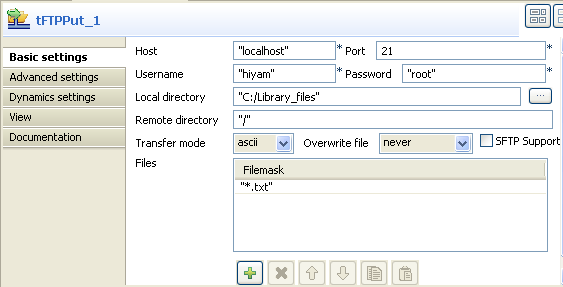
-
Enter the host name and the port number in their corresponding
fields. -
Enter your connection details in the corresponding Username and Password
fields. - Browse to the local directory, or enter it manually in the Local directory field.
- Enter the details of the remote server directory.
-
Select the transfer mode from the Transfer
mode list. -
On the Files panel, click on the plus
button to add new lines and fill in the filemasks of all files to be copied
onto the remote directory. In this scenario, the files to be saved on the
FTP server are all text files. -
Save your Job and press F6 to execute
it.Files defined in the Filemask are copied on the remote server.
Document get from Talend https://help.talend.com
Thank you for watching.
Subscribe
Login
0 Comments