Extracting data from the database table and writing it into an LDIF
file
-
Double-click tMysqlInput to open its
Basic settings view.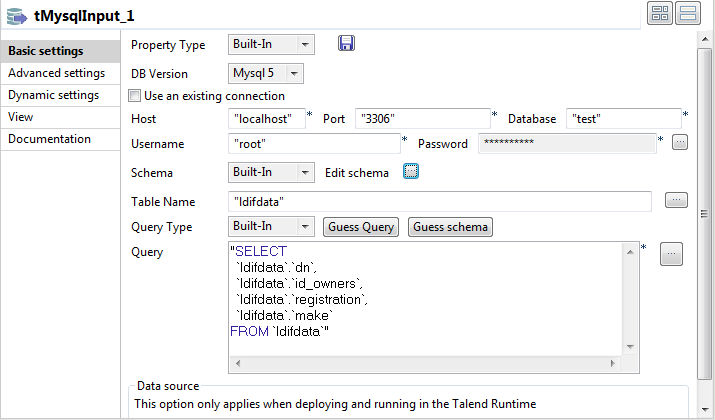
-
Fill in the Host, Port, Database, Username, and Password fields with your MySQL database connection
details. -
Click the […] button next to Edit schema and in the pop-up window define the
schema by adding four columns: dn,
id_owners, registration, and make,
all of String type. -
In the Table Name field, enter the name
of the table from which the data will be read. In this example, it is
ldifdata. -
Click the Guess Query button to fill in
the Query field with the auto-generated
query. -
Double-click tFileOutputLDIF to open its
Basic settings view.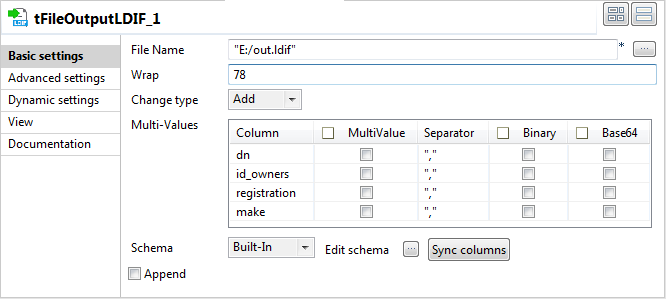
-
In the File Name field, browse to or
enter the path to the LDIF file to be generated. In this example, it is
E:/out.ldif. -
Select the operation Add from the
Change type list. -
Click the Sync columns button to retrieve
the schema from the preceding component.
Document get from Talend https://help.talend.com
Thank you for watching.
Subscribe
Login
0 Comments