Setting configuration parameters in the QAS files
-
For both Linux and Windows, edit the
qaworld.ini file to configure the related country
section for tQASBatchAddressRow‘s output schema.For example, if your address layout for Luxembourgish addresses has three
lines, the configuration could look like the following:123456789[LUX]CountryBase=LUXCleaningAction=AddressLUXAddresLineCount=3LUXAddresLine=W60LUXAddresLine=W60LUXAddresLine=W60,C11,L11This example contains the following parameters:
-
LUXAddressLineCount=3where 3 is
the number of lines of the address; and -
LUXAddressLineNwhere the values are element codes
separated by commas. In this example,
LUXAddressLine3=W60,C11,L11means that the max
width of the third line (LUXAddressLine3) of the
address is 60 characters (W60). The postal code
(C11) and the locality
(L11) appear on this line. -
LUXCapitaliseItem=L11means that the locality
(L11) appears in upper case in the formatted
address.
For more information about setting the output address format in
qaworld.ini, see QAS documentation. -
-
Set the path and the library path environment variables to
point to the QAS files.For Linux, open the ~/.profile file in your home folder
and add the following lines, modify them according to your extract
location:123# for QAS Batch JNIexport PATH=$PATH:/path/to/qasbatch/apps #the folder which contains qaworld.iniexport LD_LIBRARY_PATH=$LD_LIBRARY_PATH:/path/to/jni_wrapper_folderFor Windows, add the path to the folder which contains
qaworld.ini to thePATH
environement variable. -
If you install QAS Batch API manually on Linux, do the
following:-
Add a new line at the end of ./apps/qalicn.ini and
put a valid license. -
Put valid files which contain country address data into the right
folder, and configure qawserve.ini to add country
support. There must be three elements for each country line: a short
name, a full country name, and data path which can be relative or
absolute.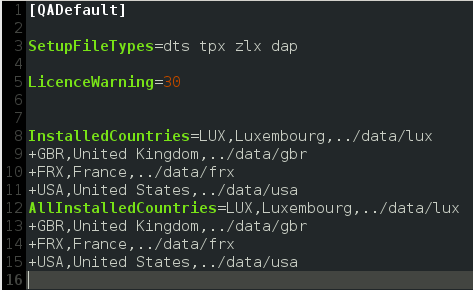
-
Add a new line at the end of ./apps/qalicn.ini and
Document get from Talend https://help.talend.com
Thank you for watching.
Subscribe
Login
0 Comments