Setting up the parent Job
-
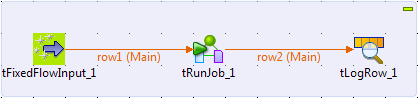
Create a Job, and add three components by typing their names on the design
workspace or dropping them from the Palette
to the design workspace:-
a tFixedFlowInput, to generate a
message -
a tRunJob, to call the Job named
child -
a tLogRow, to display the
execution result on the console
-
-
Connect the tFixedFlowInput component to
the tRunJob component and the tRunJob component to the tLogRow component using the Row > Main
connections. -
Double-click the tFixedFlowInput
component to open its Basic settings
view.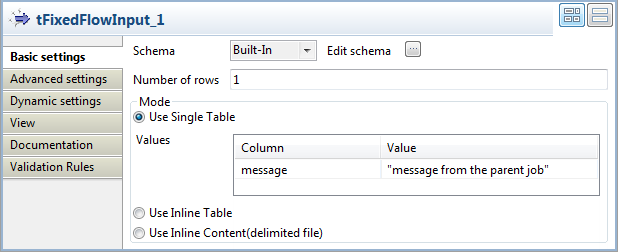
-
Click the […] button next to Edit schema to open the [Schema] dialog box and define the schema of the input data.
In this example, the schema has only one column message of the string type.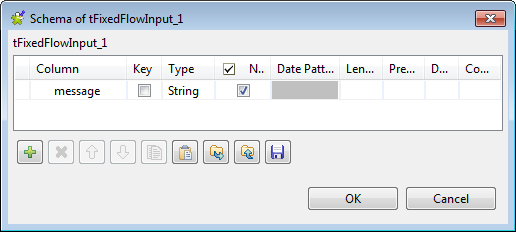 When done, click OK to validate the
changes. -
In the Mode area, select the Use Single Table option, and define the
corresponding value for the message
column in the Values table. In this
example, the value is “message from the parent
job”. -
Click the tRunJob component and then
click the Component tab to open its
Basic settings view.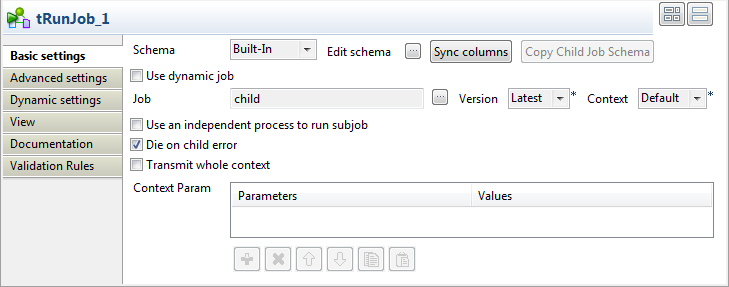
-
Click the Sync columns button and then
click Yes in the pop-up [Propagate] dialog box to retrieve the schema
from the preceding component. -
Click the […] button next to the
Job field to open the [Repository Content] dialog box.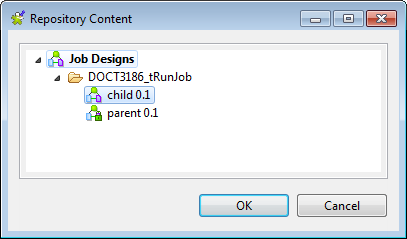 In the [Repository Content] dialog box,
select the Job named child and then click
OK to close the dialog box. -
In the Advanced settings view of the
tRunJob component, select the Propagate the child result to the output schema
check box. With this check box selected, the buffered output of the child
Job will be propagated to the output component.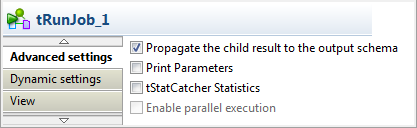
Document get from Talend https://help.talend.com
Thank you for watching.
Subscribe
Login
0 Comments