Set the components
In this example, the value set in the parent Job is transferred to the child Job.
There, it is modified and adopts the value of the child Job, and then transferred to
the parent Job again.
-
In parentJob, select the tSetEnv component and click the Component tab. Add a variable row by clicking the
[+] button to set the initial value of
the variable. Type Variable_1 in the
Name field, and Parent job value in the Value field. -
Select the first tMsgBox component, and click
the Component tab. In the Message field, type the message displayed in the
info-box which confirms that your variable has properly been taken into
account. For example:
"Parent:"+System.getProperty("Variable_1")displays the
variable set in the tSetEnv component (here
Parent job value). -
Select the second tMsgBox component, and
click the Component tab. In the Message field, type the
"Parent:"+System.getProperty("Variable_1")line again. It
makes the variable set in the child Job appear. -
Select the tRunJob component and click the
Component tab. In the Job field, type the name of your child Job, here
ChildJob. This will run the child Job
when you run the parent Job.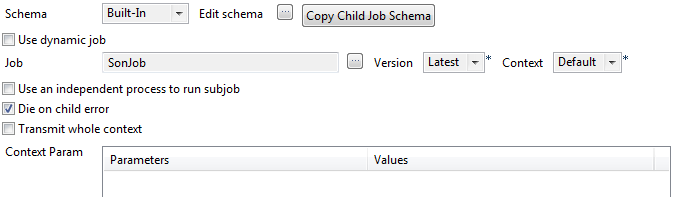
-
Now double-click the tRunJob component to open the
child Job ChildJob. -
Select the tSetEnv component, and click the
Component tab. Add a variable row by
clicking the [+] button to set the initial
value of the variable. Type Variable_1 in
the Name field, and Child job value in the Value field. -
Select the tMsgBox component and click the
Component tab. In the Message field, type the message displayed in the
info-box which confirms that your variable has properly been taken into
account. For example:"Son:"+System.getProperty("Variable_1")
displays the variable set in the tSetEnv
component (here Child job value).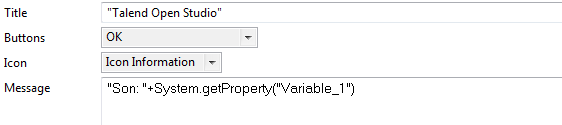
-
Save your Job, go back to parentJob, then
run the Job by pressing F6.
Document get from Talend https://help.talend.com
Thank you for watching.
Subscribe
Login
0 Comments