Writing data to the existing table
-
Double-click tFixedFlowInput to open its
Basic settings view.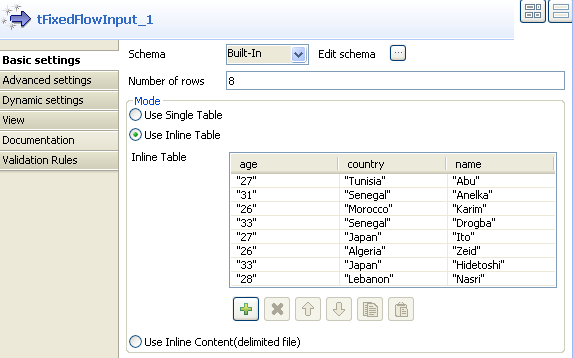
-
Click Edit schema to define a same schema
as the one you defined in tHCatalogOperation. -
Fill the Number of rows field with
integer 8. - Select Use Inline Table in the Mode area.
-
Click [+] to add new lines in the inline
table. -
Double-click tHCatalogOutput to open its
Basic settings view.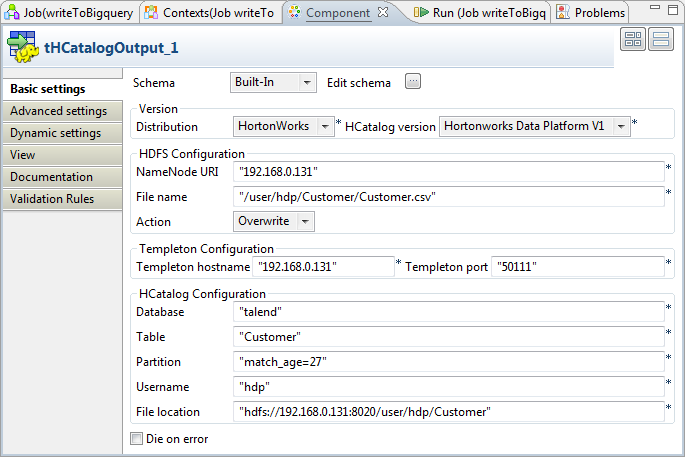
-
Click Sync columns to retrieve the schema
defined in the preceding component. -
Fill the NameNode URI
field with the URI to the NameNode. If you are using WebHDFS, the location should be
webhdfs://masternode:portnumber; if this WebHDFS is secured
with SSL, the scheme should be swebhdfs and you need to use
a tLibraryLoad in the Job to load the library required by
the secured WebHDFS. -
Fill the File name field with the HDFS
location of the file you write data to. In this scenario, the file location
is “/user/hdp/Customer/Customer.csv“. - Select Overwrite from the Action list.
-
Fill the Templeton hostname field with
URL of the Templeton webservice you are using. In this scenario, fill this
field with “192.168.0.131“. -
Fill the Templeton port field with the
port for Templeton hostname. By default,
the value for this field is “50111“ -
Fill the Database field, the Table field, the Username field with the same value you specified in
tHCatalogOperation. - Fill the Partition field with “match_age=27“.
-
Fill the File location field with the
HDFS location to which the table will be saved. In this example, use
“hdfs://192.168.0.131:8020/user/hdp/Customer“.
Document get from Talend https://help.talend.com
Thank you for watching.
Subscribe
Login
0 Comments