Writing the data into Redshift
-
Double-click tRedshiftOutput to open its
Basic settings view.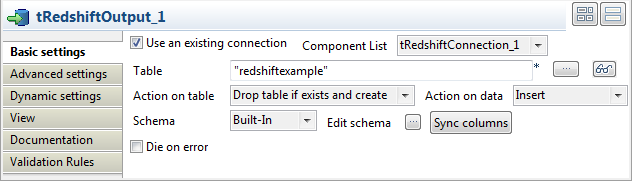
-
Select the Use an existing connection
check box, and then select the connection you have already configured for
tRedshiftConnection from the Component List drop-down list. -
In the Table field, enter or browse to
the table into which you want to write the data, redshiftexample in this scenario. -
Select Drop table if exists and create
from the Action on table drop-down list,
and select Insert from the Action on data drop-down list. -
Click Sync columns to retrieve the schema
from the preceding component tFixedFlowInput.
Document get from Talend https://help.talend.com
Thank you for watching.
Subscribe
Login
0 Comments