Configuring the process of filtering and extracting the data of interest
To do this, proceed as follows:
-
In the design workspace, connect tStandardizeRow to tFilterColumns with a Row
> Main link. -
In the Basic settings view of tFilterColumns, click the […] button next to the Edit
schema field to open the schema editor.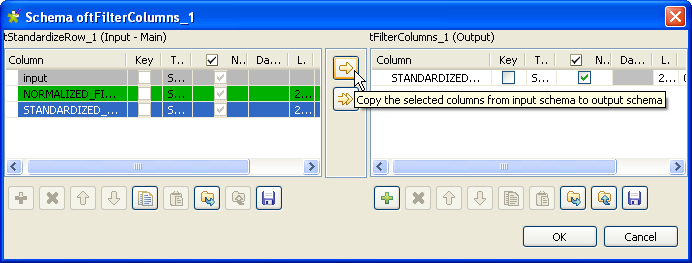
-
Click on the STANDARDIZED_FIELD column, click the
first arrow to filter this column, and then click OK to close the editor and validate the changes. -
In the design workspace, connect tFilterColumns to tExtractXMLField with a Row
> Main link. -
Double-click the tExtractXMLField
component to display its Basic settings
view. -
Click the […] button next to the
Edit schema field to open the schema
editor, add four columns and name them respectively
number, street,
zip and city, and then click
OK to validate and close the
editor.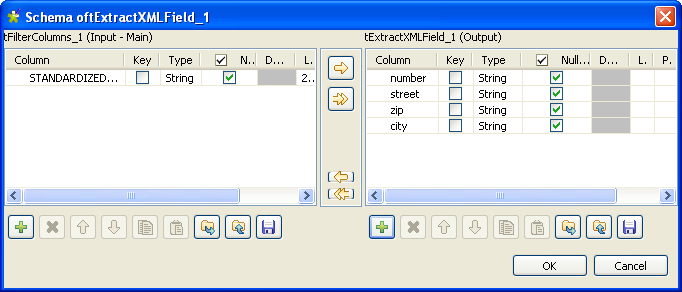
-
In the XML field field, check that the
STANDARDIZED_FIELD column is selected.The content of the STANDARDIZED_FIELD column is an
XML field with a<record>tag as root. Under this tag,
the structure defined by the rules configured in the tStandardizeRow component allows to extract each item of the
address, as you can see in the following capture.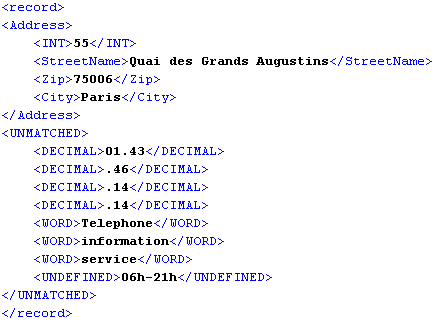
-
In the Loop XPath query field, type in
“/record/Address”. -
In the Mapping table, in the XPath query field, enter
“INT” for the number column,
“StreetName” for the street
column, “Zip” for the zip column
and “City” for the city
column.
Then you can prepare to execute the Job.
Document get from Talend https://help.talend.com
Thank you for watching.
Subscribe
Login
0 Comments