Configuring the process of matching data
You need to select the data columns of interest before matching them using
tFirstnameMatch.
tFirstnameMatch.
-
Click the tFilterColumns component to
display its Basic settings view and define
the component properties. -
Click the […] button next to
Edit schema to open a dialog box. -
Select the name and
gender columns from the input schema and move them to
the output schema.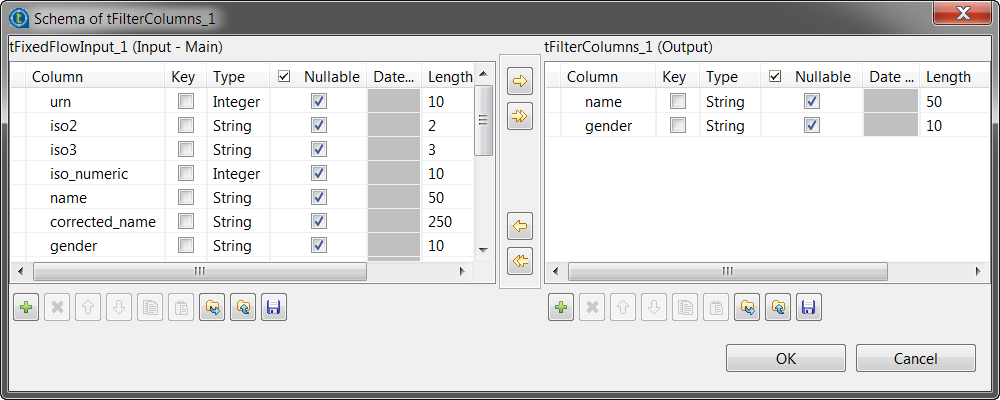
-
Click OK to validate your changes and
close the dialog box. -
Click tFirstnameMatch to display the
Basic settings view and define the
component properties. -
Click the […] button next to
Edit schema to view the input and output schemas, and
then click OK to close the dialog
box.The output schema of this component is the same as the input schema plus one
fixed column: FIRSTNAMEMATCH.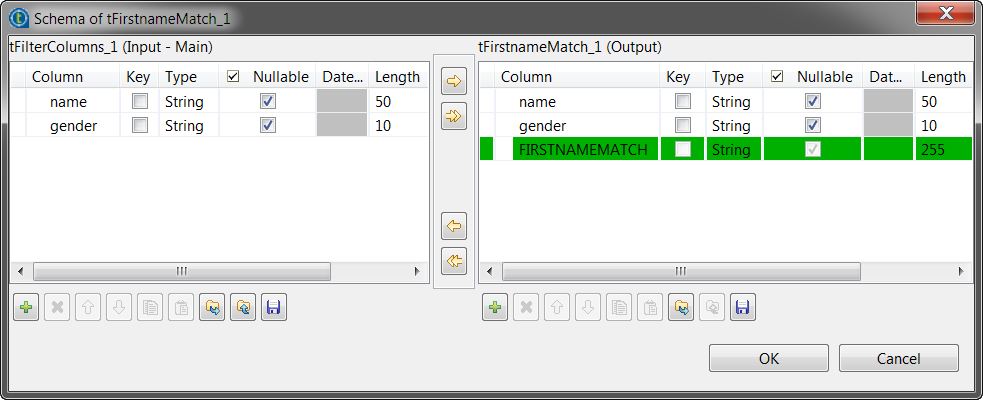
-
From the First Names
list, select the column that holds the first names, name
in this example. -
If required, select the Use
Gender or the Use Country
check box and, from the list, select the column that contains the gender or
country respectively.This will optimize system performance and will give more precise
results. -
If required, select the Fuzzy Search
check box if you want to get the first-name best match possible, in case
several matches are available.
Document get from Talend https://help.talend.com
Thank you for watching.
Subscribe
Login
0 Comments