Configuring the process of normalizing rows
To do this, proceed as follows:
-
Double-click tStandardizeRow to open
its Component view.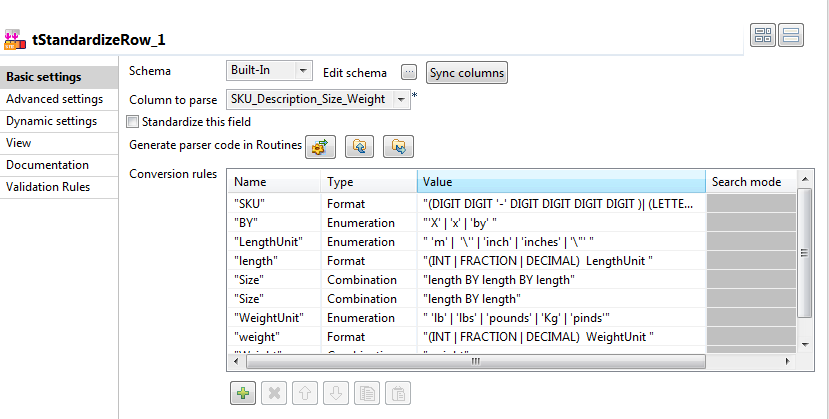
-
In the Column to parse field, select
SKU_Description_Size_Weight. This is the only
column that the incoming schema has. -
Under the Conversion rules table,
click the plus button eight times to add eight rows in this
table. -
To complete these rows, type in the rules you have figured out when
analyzing the raw data at the beginning of this scenario.The two Size rules are executed in top-down
order. In this example, this order allows this component to match
firstly the sizes with three numbers and then those with two numbers. If
you reverse this order, this component will match the first two numbers
of all sizes before all and then treat the last number of the
three-numbers sizes as unmatched. -
Click the Generate parser code in
routines button. -
In the Advanced settings view, leave the
options selected by default in the Output
format area as they are.The Max edits for fuzzy match is set to
1 by default.
Document get from Talend https://help.talend.com
Thank you for watching.
Subscribe
Login
0 Comments