Training the model using Random Forest
-
Double-click tRandomForestModel to open its
Component view.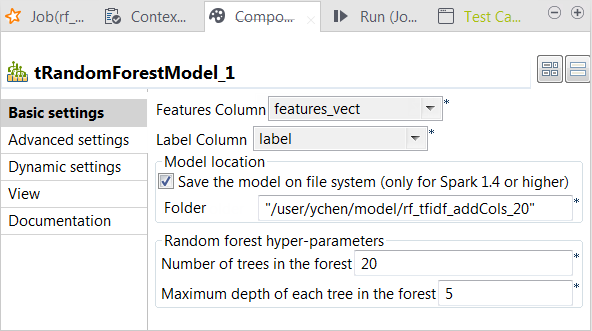
-
From the Label column list, select the
column that provides the classes to be used for classification. In this
scenario, it is label, which contains two
class names: spam for junk messages and
ham for normal messages. -
From the Features column list, select the
column that provides the feature vectors to be analyzed. In this scenario,
it is features_vect, which combines all
features. -
Select the Save the model on file system
check box and in the HDFS folder field that
is displayed, enter the directory you want to use to store the generated
model. -
In the Number of trees in the forest
field, enter the number of decision trees you want tRandomForestModel to build. You need to try different numbers
to run the current Job to create the classification model several times;
after comparing the evaluation results of every model created on each run,
you can decide the number you need to use. In this scenario, put 20.An evaluation Job will be presented in one of the following
sections. - Leave the other parameters as is.
Document get from Talend https://help.talend.com
Thank you for watching.
Subscribe
Login
0 Comments