Writing the aggregated data
-
Double-click tPigStoreResult to open its
Component view.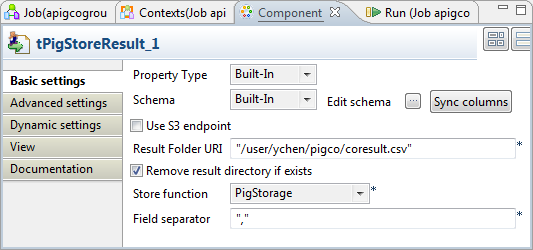
-
If this component does not have the same schema of the preceding component, a warning
icon appears. In this case, click the Sync
columns button to retrieve the schema from the
preceding one and once done, the warning icon disappears. -
In the Result folder URI field, enter the path in HDFS
pointing to the location you want to write the result in. -
Select the Remove result directory if exists check
box. - From the Store function list, select PigStorage.
-
In the Field separator field, enter the separator you want to
use. In this scenario, enter a comma (,).
Document get from Talend https://help.talend.com
Thank you for watching.
Subscribe
Login
0 Comments