Writing data in a database table
-
Double-click the tRowGenerator component
to open the Row Generator editor.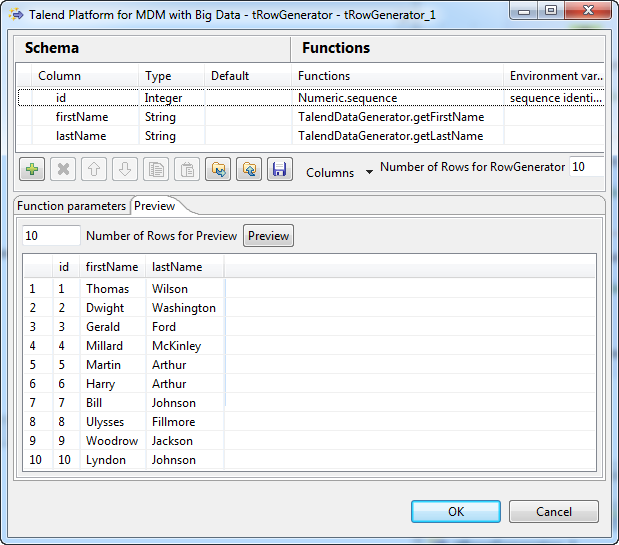
-
Add three columns as shown below to generate 10 data
rows:-
id, Integer type, using
Numeric.sequence from the
Function list to generate
sequence numbers. -
firstName, String type, using TalendDataGenerator.getFirstName from the Function list to generate random first
names. -
lastName, String type, using
TalendDataGenerator.getLastName
from the Function list to generate
random family names.
-
-
In the Basic settings view of tRowGenerator in the Component tab, click the Edit
Schema button to open the schema editor. Set the length of
the id, firstName, lastName
column to 4, 10, and
10.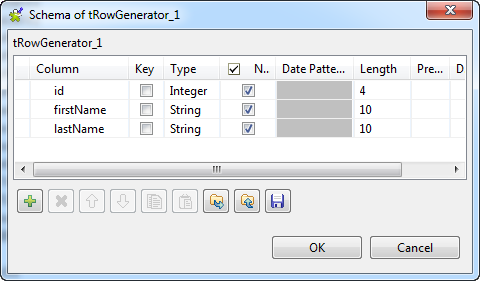 When done, click OK to close the editor
and click Yes when prompted to propagate
the schema to the next component.For more information about how to configure the tRowGenerator component, see tRowGenerator. -
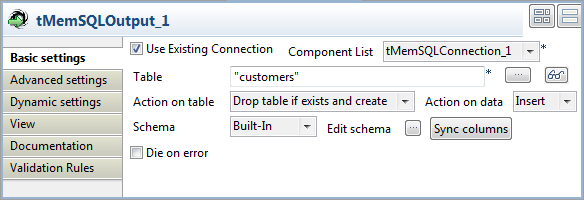
Double-click tMemSQLOutput to open its Basic Settings view in the Component tab.
-
Select the Use Existing Connection check
box. The Component List is filled in
automatically with tMemSQLConnection_1.Fill the Table field with the database
table, customers in this example.Select Drop table if exists and create in
the Action on table list, and Insert in the Action on
table list.
Document get from Talend https://help.talend.com
Thank you for watching.
Subscribe
Login
0 Comments